

Over the past three weeks, I wrote about why this happens. First, about the personal gap at the top. Leaders who approve AI budgets but never build a real habit with the tool themselves. Then about the structural gap. Projects that end at go-live, with no clear owner for what comes after. Last week, about the behavioral gap. The three patterns inside teams that quietly kill adoption before anyone notices.
Diagnosis is useful. But it does not fix anything on its own.
This article is the actionable part. A week-by-week playbook for the first 30 days after you deploy an AI tool. Not theory. Not best practices from a consulting slide deck. This is what I would do, based on what I have seen work and fail across multiple AI projects in a large supply chain organization.
The first 30 days decide everything. If people do not change how they work in that window, they will not change at all. The tool becomes background noise. Another icon on the desktop nobody clicks.
Here is how to prevent that.
Week one: show, do not tell

The biggest mistake in the first week is scheduling training.
That sounds counterintuitive. You have a new tool. People need to learn it. Training seems like the obvious first step.
It is not.
Training in week one sends a signal: "This is something you need to learn." That makes it feel like homework. And homework gets postponed. People are busy. They have deadlines. The training becomes something they will get to "when things calm down." Things never calm down.
The first week should do one thing only: make the tool visible as something that serious people already use.
This starts with the leader. Not the project manager. Not the trainer. The person who has organizational weight in the room. I wrote about this three weeks ago. If a senior leader is still at level one of AI maturity, their team will stay at level one. Not because the team lacks capability. Because they lack visible permission.
The most effective first move I have seen was not a training session. It was a senior leader forwarding a summary prepared with the AI tool and adding one line: "This took me 15 minutes instead of my usual hour. I want your team to try this for next week's review."
That email moved adoption more than three months of workshops.
In parallel, the product leader identifies three to five people who are already curious. Not the whole team. Not the department. Three to five individuals who have shown interest in trying new tools or who are naturally early adopters. You do not need mass adoption in week one. You need a small group of people who start using the tool for real tasks. Not experiments. Not sandbox exercises. Real work that produces real output.
By end of week one, the goal is simple. Several people in the organization have seen a senior leader use the tool. A handful of early adopters are using it on real tasks. Nobody was forced to attend a training session.
The permission signal has been sent.
Week two: break one spreadsheet
Every operations team has at least one process that lives in a personal spreadsheet. I wrote about this last week. That spreadsheet is not just a file. It is proof of expertise. The person who built it knows every cell, every formula, every edge case. When a new AI tool threatens to replace that output, the person does not feel relief. They feel replaced.
Week two is about turning that dynamic around.
Find the person in your team who built the most critical spreadsheet. The one everyone depends on. The one nobody else fully understands. That person is usually the strongest potential critic of the new tool. They have the most to lose.
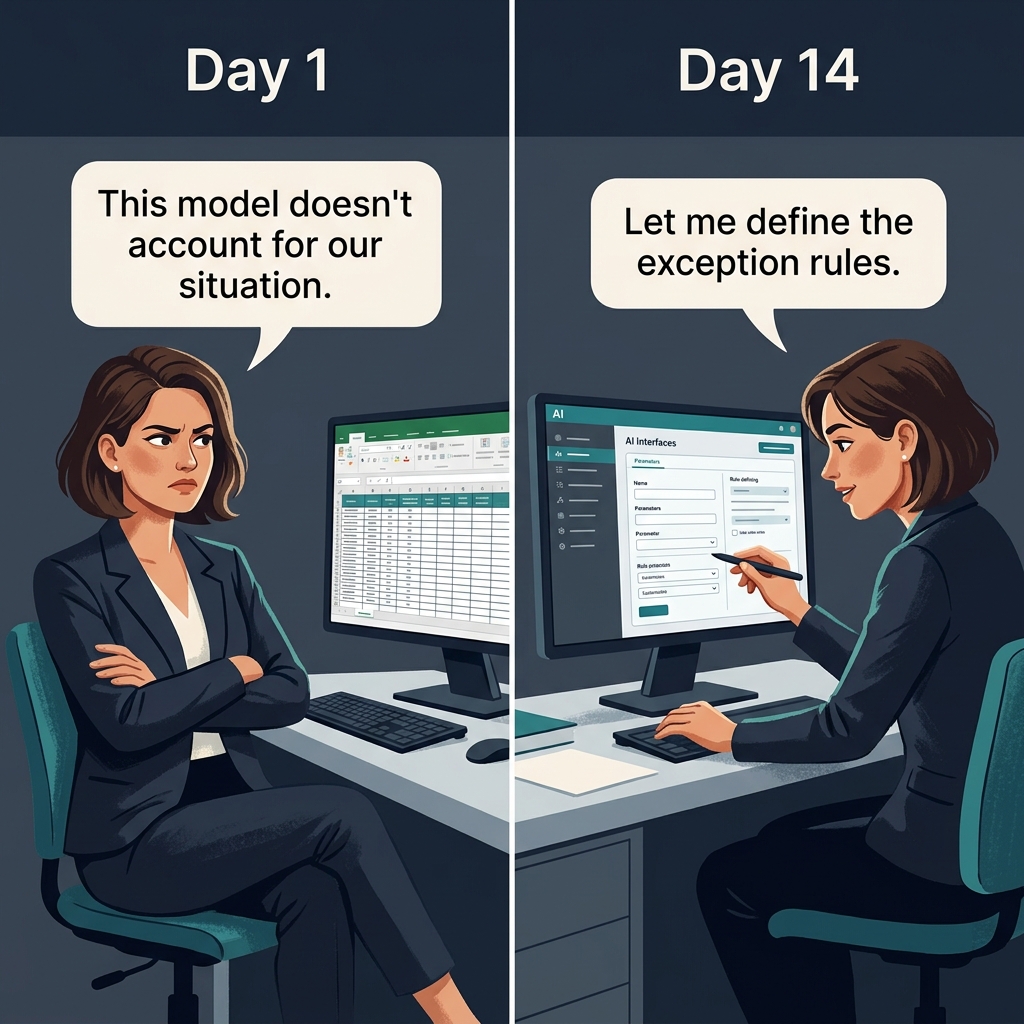
Do not try to convince them that the AI tool is better. Instead, ask them one question: "Would you help define the rules this model should follow?"
That question changes everything.
When the planner or analyst who built the spreadsheet becomes the person who validates, corrects, and trains the AI model, the dynamic shifts. They move from being replaced to being promoted. Their expertise becomes the input, not the output.
I saw this work firsthand. A planner who resisted the tool for months became its strongest advocate when we asked her to define the exception rules. The AI handled the routine calculations. She handled the judgment calls. Same person. Different role. Within weeks she went from skepticism to using AI daily. She started actively looking for new use cases on her own. Nobody asked her to. She found value because her expertise was part of the system, not threatened by it.
The formula is straightforward. Do not ask people to trust the AI. Ask the AI to use their knowledge.
By end of week two, you want one specific outcome. The person who was most likely to resist the tool is now actively shaping how it works. That is your strongest signal that adoption has a chance.
Week three: reset the narrative
By week three, you face a different problem. Early adopters are using the tool. The permission signal has been sent. The most critical spreadsheet owner is cooperating. But the broader team has a specific objection: "I tried it, and it only saved me 15 minutes. That is not worth the effort."
This is the busyness trap I described last week. People are too busy doing manual work to invest time in the tool that would save them hours. The irony is real. But the deeper issue is expectation.
When teams first engage with AI, they expect total change on day one. They want the full replacement of their current process. The massive productivity gain. The visible proof that everything is different now.
No tool does that in the first use.
What it does is solve one small problem. It handles a routine check. It drafts a standard report. It flags an anomaly that would have taken 30 minutes to find manually. The gain is real, but it feels small. Compared to the expectation, people conclude the tool is not worth the learning curve.
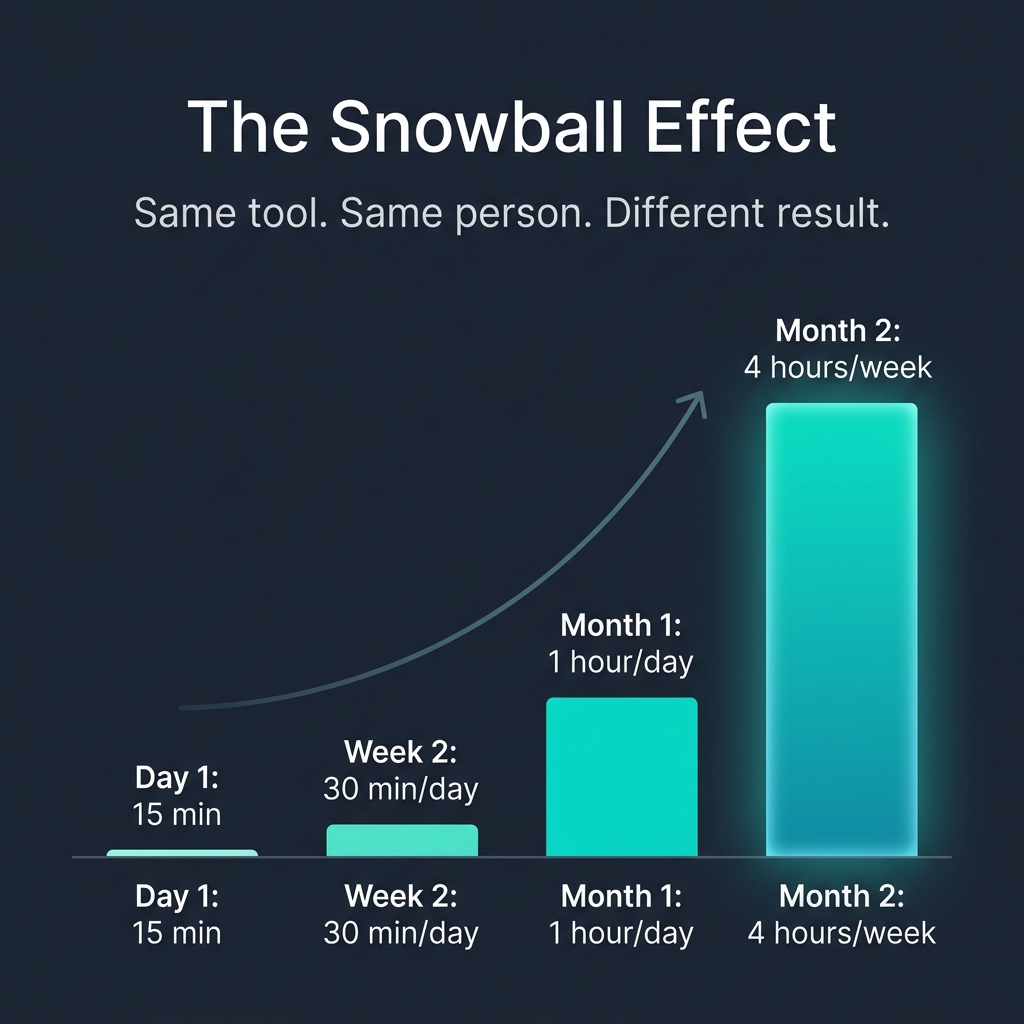
The teams that succeed understand something I call the snowball effect.
You start with one task. The tool gives you back 15 minutes. You invest those 15 minutes into learning the next use case. That one saves you another 15 minutes. Over weeks, the compound effect is significant.
In one project, what started as 15 minutes saved per day became four hours saved per planner per week within two months. Nobody called it "not worth the learning curve" after that. But the first week, the gain was exactly 15 minutes. If we had let people judge the tool by that first result, they would have walked away.
Week three is when the product leader must actively manage the narrative. Not by making big promises. By showing the snowball.
Find the early adopters from week one. Ask them to share their experience with one skeptical colleague. Not in a presentation. Not in a town hall. In a conversation. "Hey, I started using this for the weekly capacity check. It saves me about 20 minutes. If you want, I can show you how I set it up."
Peer to peer works. Manager to team does not. People trust colleagues who are at their level and do similar work. A recommendation from a fellow planner carries more weight than a directive from the head of the department.
Simultaneously, the product leader collects feedback. Not through a survey form. Through direct conversations. What is working. What is not. What confuses people. What feature is missing.
And then the critical part: address the feedback publicly. Send a short update. "Based on what I heard this week: the export function is confusing. We are fixing it. The exception handling needs more rules. Maria is working on that. The weekly digest feature will be ready next Tuesday."
This does two things. It shows the tool is evolving. And it shows that people's input matters. Both signals are necessary for adoption to continue past the initial curiosity phase.
Week four: the checkpoint
Week four is not about pushing harder. It is about honest assessment.
By now, the tool has been deployed for a month. Some people use it daily. Others tried it once and went back to the old process. A few have not touched it at all.
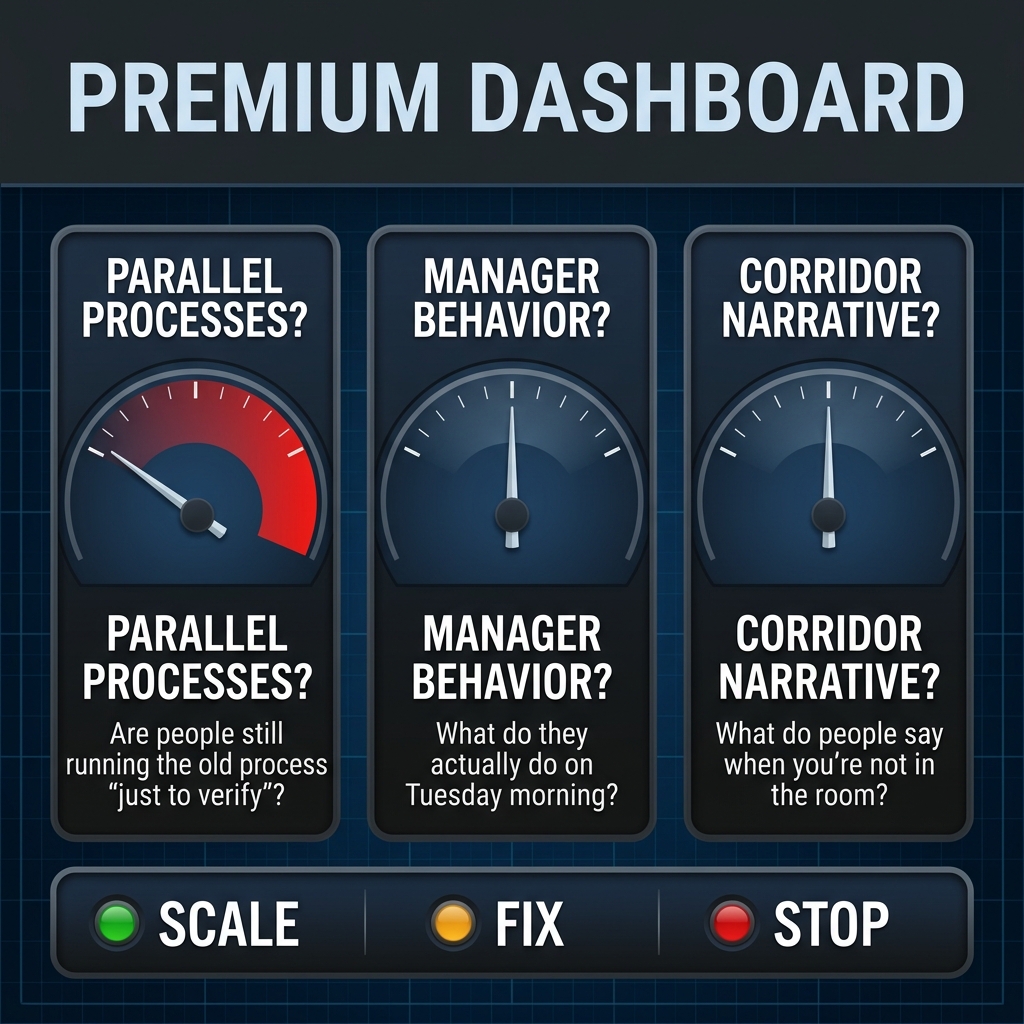
Before deciding what to do next, run three checks.
First, look for parallel processes. Who in your team is running the old process alongside the new one "just to verify"? This is one of the clearest signals that trust has not been established. The person is not verifying. They are protecting themselves. If three weeks of use have not built enough confidence to drop the old process, the problem is not the tool. The problem is either data quality, unclear ownership, or a missing feedback loop. Identify which one.
Second, watch what managers do. Not what they say in meetings. What they actually do on a normal workday. If the manager asks for the report in the old format, the team reads that as a signal. If the manager uses the AI output in the review meeting, the team reads that as a different signal. This is the permission layer from week one. By week four, it should be visible in daily routines, not just in announcements.
Third, check the narrative. What do people say about the tool in the corridor? Not in the formal feedback session. In the informal conversations. If they say "it is okay, but I still do most of the work manually," the snowball has not started. If they say "it handles the routine, and I focus on the exceptions now," you are on track.
Based on these three checks, you make one of three decisions.
If adoption is growing and the indicators are positive: scale. Expand to the next team. Use the same week-by-week structure. Start with the permission signal, find the spreadsheet owner, reset the narrative, checkpoint.
If adoption is flat but not declining: fix. Something is blocking progress. Usually it is one of three things. The tool has a usability problem that nobody addressed. The manager is not visibly using it. Or the first use case was too small to be motivating. Identify the block and address it before expanding.
If adoption is declining and people are actively reverting to old processes: stop and investigate. Do not push harder. Something fundamental is broken. It could be data quality. It could be that the use case does not match the actual workflow. It could be that the tool was deployed to the wrong team first. Understand what happened before investing more effort.
This is where the product leader role matters most. A project leader would close the project at this point. Milestones hit. Tool deployed. Move on. A product leader stays and makes the decision. Scale, fix, or stop. That distinction is the difference between a tool that becomes part of how people work and a tool that quietly disappears.
Why 30 days is the window
There is a practical reason why the first 30 days matter more than any other period.
Habits form through repetition. Research on behavior change consistently shows that the first weeks of exposure determine whether a new practice sticks. After 30 days, people have either integrated the tool into their routine or decided it is not worth the effort. Reversing that decision later is significantly harder than getting it right the first time.
The second reason is organizational memory. Within 30 days, the organization forms its informal opinion about the tool. "That new AI thing? Yeah, it works okay but nobody really uses it." Or: "That new AI thing? Maria's team swears by it. Their weekly review takes half the time now." Which narrative wins in the first month is usually the narrative that sticks.
That is why passive deployment fails. Deploying a tool and waiting for adoption to happen organically is not patience. It is neglect. Without active management of the permission signals, the spreadsheet owners, the narrative, and the feedback loop, even the best technology will sit unused.
Putting the three layers together
The 30-day playbook does not work in isolation. It connects the three layers I described over the past weeks.
The personal layer. A leader who uses the tool themselves sends a permission signal that no training session can replicate. Without this, week one stalls.
The structural layer. A product leader who stays accountable beyond go-live is the person who runs the checkpoint in week four and makes the scale, fix, or stop decision. Without this, the tool loses its owner and drifts.
The behavioral layer. Addressing the spreadsheet comfort zone, the missing permission, and the busyness trap is what makes weeks two and three work. Without understanding these patterns, the playbook becomes a set of mechanical steps that miss the human side of change.
All three layers together create the conditions where a good AI tool becomes an operating standard. Not a pilot that gets archived. Not an experiment that gets quoted in presentations. A tool that people use every day because it makes their work better.
What to do this week
If you are in the middle of an AI deployment right now, here are three things you can do before Friday.
Ask your most senior stakeholder to use the tool for one real task this week and share the result visibly. An email, a message in the team channel, a mention in a meeting. One visible use from a credible person.
Identify the one spreadsheet owner in your team who would feel most threatened by the new tool. Ask them to help define how the tool should handle exceptions. Do not sell the tool to them. Ask for their expertise.
Check the narrative. What are people actually saying about the tool when you are not in the room? If you do not know, you are flying blind. Find out before you plan your next move.
These are not complex interventions. They cost nothing except attention and the willingness to have honest conversations about what is really happening.
Next week, I will share how to structure the follow-up after day 30. What to measure, how to decide which teams to expand to next, and how to build the internal case for broader rollout.